
WINDOWS APP
.sav · .zsav · .dta
.sas7bdat · .xpt · .por
SAV & DTA File Viewer
Open SPSS (.sav, .zsav), Stata (.dta) and SAS (.sas7bdat, .xpt) data files, plus SPSS portable (.por) files, on Windows without SPSS, Stata or SAS. Read variables, labels and missing values for free, then save an Excel or CSV copy with Pro. Your files stay on your PC.
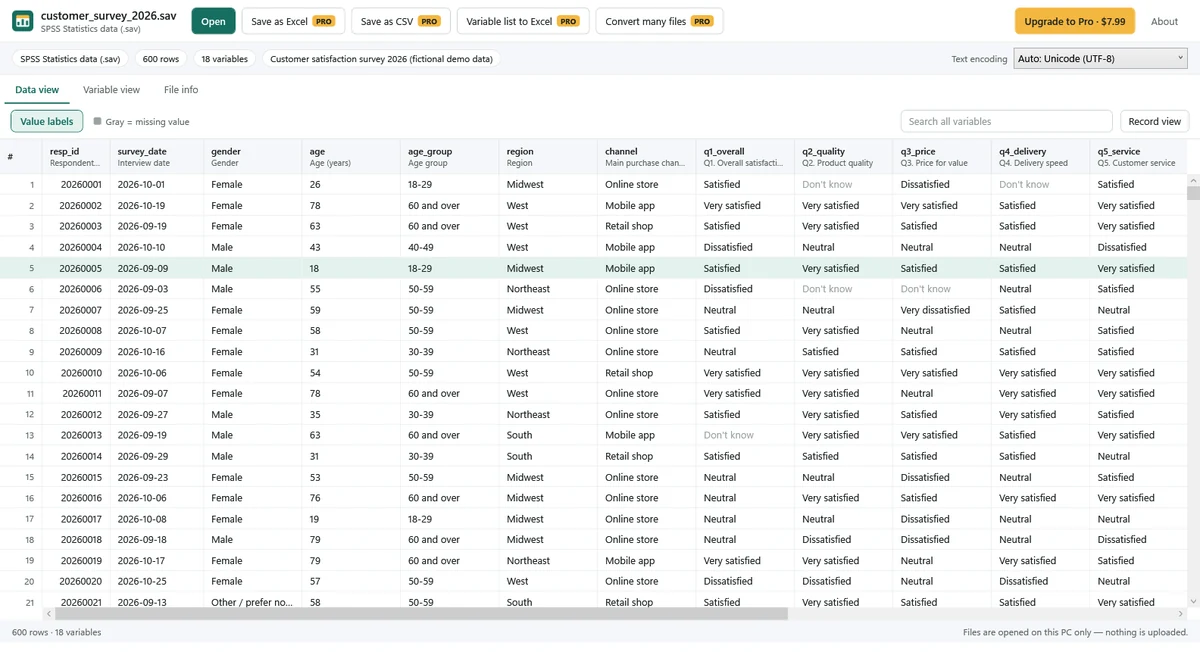
Free: open and read
- Open SPSS .sav and .zsav files and Stata .dta files, including older Stata formats, plus SAS .sas7bdat and .xpt and SPSS portable .por files.
- See variable names and labels, sort the data and search every variable.
- Switch between stored codes and value labels with one click.
- See missing values in gray, including SPSS user-missing values and Stata .a–.z.
- Use Variable view to inspect types, display formats, labels, value labels, missing values and measure levels.
- Check File info for row and variable counts, file labels, notes and text encoding.
- Read every variable of a case in Record view, or choose text encoding manually for older files.
- Copy a cell or one row. File viewing works offline without upload.
Pro: convert and export
One-time purchase. No subscription. Check Microsoft Store for the current price.
- Save as Excel (.xlsx) or CSV, choosing stored values or value labels. Dates become real Excel dates in .xlsx output.
- Save the variable list (codebook), including value labels, as Excel.
- Copy multiple rows at once with headers.
- Convert multiple files at once.
Supported files and performance
The app reads SPSS .sav and .zsav data, Stata .dta data, SAS .sas7bdat and .xpt data and SPSS portable .por data. In our tests, a file with 100,000 rows and 200 variables opened in about 1–2 seconds. Opening time depends on your PC and file.
SAS (.sas7bdat, .xpt) and SPSS portable (.por)
- Open SAS data sets (.sas7bdat), including compressed files (RLE and RDC), 32- and 64-bit and little- and big-endian files. No SAS needed.
- Open SAS transport files (.xpt, XPORT v5 and v8; the first data set in the file) and SPSS portable files (.por).
- SAS dates are shown as dates, and common SAS number formats such as DOLLAR, COMMA and PERCENT are applied.
- Accuracy: 77 test files (54 .sas7bdat, 17 .xpt, 6 .por) and 30,503,910 cells matched pyreadstat with no differences.
- A 104 MB .sas7bdat with 1,088,682 rows opened in 0.89 seconds on our test PC; files are read in the background.
See how to open a .sas7bdat file without SAS.
Good to know
- This is a viewer and converter. It does not edit data, run statistical analyses or make charts.
- SAS format catalogs (.sas7bcat) are not read, so SAS values are shown without their format labels, as the stored values. SAS CPORT files and SPSS output (.spv) files are not supported.
- If an older file's text looks wrong, choose the text encoding manually and check the result.
- A truncated or damaged file produces a message. When possible, the app opens rows it can read; this does not restore missing data.
Private by design
Files are processed locally on your PC, never uploaded or collected by SoyaTools. Excel and CSV exports are saved to locations you choose. Microsoft Store handles Pro purchases. Read the Privacy Policy.